Wave AI Note Taker & Recorder
- 4.5
- Rating
- 100.00K
- Installs
- Free
- Price
 Analysis by App-foxy
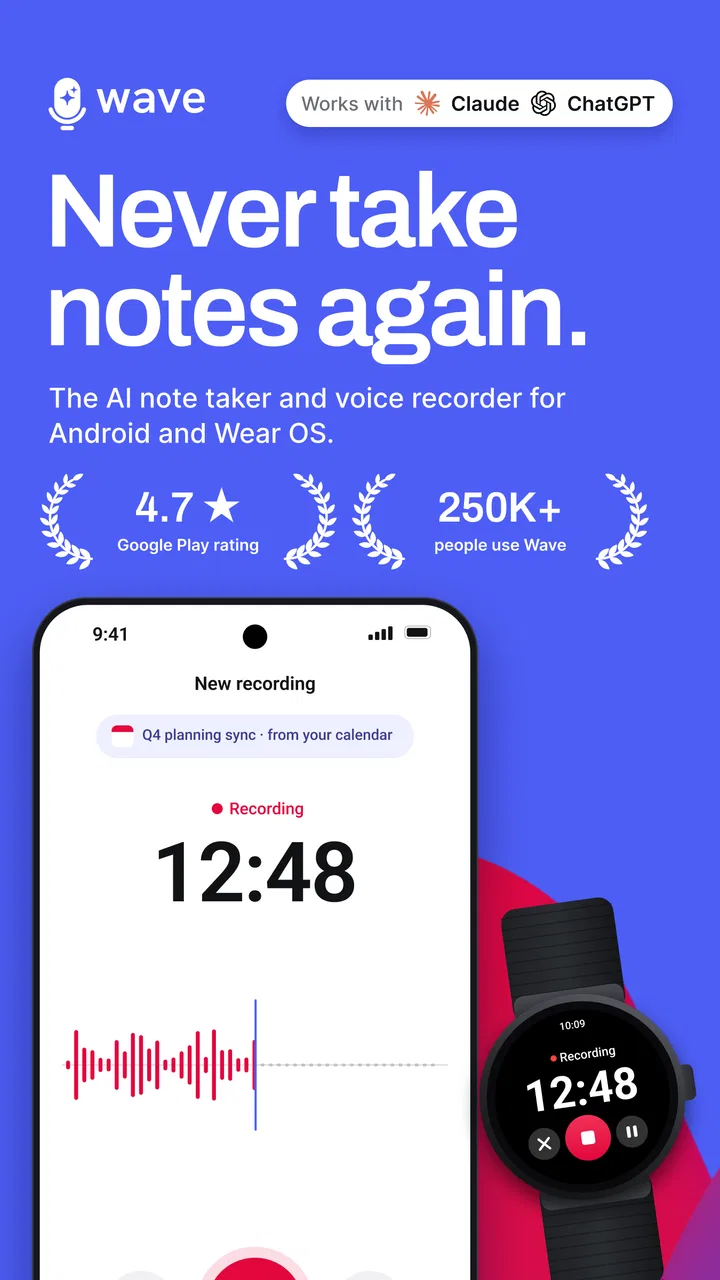
I know the familiar feeling: a meeting ends, a lecture moves on, or a useful idea appears while I am doing something else, and I am left trying to reconstruct it from memory. Typing everything is distracting, while recording alone creates a long audio file that still needs to be searched and understood. Wave AI Note Taker & Recorder is designed to reduce that particular problem by putting recording and transcription behind a one-tap workflow.
After using it as a productivity tool, I see its main value less as a replacement for careful note-taking and more as a safety net. I can stay focused on a conversation instead of constantly looking down at a keyboard. Later, the transcript gives me something much easier to scan than raw audio. The real benefit is recovered attention, not simply another place to store notes.
How Wave AI fits into real note-taking
Wave AI is a free productivity app from Mohrer Associates for Android and iOS users who need to capture spoken information. Its focus is straightforward: record meeting notes, voice memos, and lecture notes with a single tap, then turn that speech into written text. That narrow purpose helps the app feel approachable, especially when I do not want to build a complicated project, folder, or task system before recording something.
You May Also Like

 Blood Strike: 2.5 Anniversary
Blood Strike’s Loadouts Turn Every Drop Into a Tactical Gamble
A close look at Blood Strike’s custom loadouts: how fast access to signature weapons reshapes its battle royale rhythm, rewards preparation, and narrows the gap between fights.

 Pandora - Music & Podcasts
Pandora’s Music Is Easy to Start, but Harder to Recover
Pandora’s strength is its low-effort path from a seed to a station. Its weak spot is how much confidence it asks you to place in connection, setup, and quiet recovery.

 8 Ball Pool
 Is Built on Rivalries, Rematches, and Routine
A close look at the rivalries, rematches, shared routines, and unanswered safety questions that turn a quick pool match into a persistent mobile community.

 Samsung Music
’s Quiet Strength Is Playing What You Already Own
Its reach comes less from spectacle than from dependable access to a personal library. That simplicity is both the app’s strongest retention engine and its ceiling.

 AccuWeather: Weather Radar
AccuWeather Review: A Quick, Clear Forecast for Everyday Decisions
For everyday plans, the best forecast is the one you can understand quickly. AccuWeather makes rain timing, radar, and local conditions easy to act on, with a few trade-offs.

 Hill Climb Racing
Why Hill Climb Racing Still Turns Crashes Into One More Run
A tiny car, a bumpy hill and one more upgrade: Hill Climb Racing keeps resurfacing because its simple chaos makes every near-miss feel personal.
More From Our News Desk
View All News


The app is marked for Everyone, which makes its intended audience broad. Students, office workers, freelancers, researchers, and anyone who regularly thinks aloud can understand the basic use immediately. It has reached over one hundred thousand installs and holds a 4.5 average from around 2.7 thousand ratings, so it is not an obscure experiment with no visible user base. I still judge it by the workflow rather than popularity, but those figures suggest that the simple recording-and-transcription idea is resonating with many people.
Wave AI is free to start, while in-app purchases range from six dollars to one hundred thirty-nine dollars and ninety-nine cents per item. That matters because a person who only needs occasional notes may find the free entry point sufficient, whereas a heavier user should examine the purchase choices before making it part of a long-term routine. I would not choose it blindly for a large team or a high-volume archive without first checking how my own usage fits the available options.
The first setup should be deliberately small
My advice is to begin with a short, low-stakes recording rather than immediately relying on Wave AI for an important interview or an entire class. Tap the recording control, speak naturally, and inspect the resulting transcript while the conversation is still fresh. This quickly shows whether the app handles your accent, speaking speed, room conditions, and vocabulary well enough for your needs.
That test is more valuable than a generic feature tour. Transcription quality is not just an app issue; it depends on distance from the speaker, overlapping voices, background noise, and how clearly people speak. A quiet voice memo may produce a much more useful result than a crowded meeting. I treat the transcript as a working draft that saves time, not as an unquestionable legal or academic record.
A useful habit is to say the context aloud at the beginning. I might mention the project name, the date of the conversation, or the question I am trying to answer. Even if the transcript later needs correction, that opening sentence gives me a searchable mental anchor and makes the recording easier to recognize. It is a small workflow improvement that does not require extra organization inside the app.
I also recommend leaving a brief pause before speaking. Starting immediately can clip the first word if I am moving quickly, and a short pause makes the beginning easier to review. For a voice memo, I can state the conclusion first and then add supporting details. This produces a more useful transcript than thinking aloud without any structure, particularly when I return to it several hours later.
A practical meeting routine
For a normal meeting, I would start the recording just before the discussion begins and keep my own written notes limited to names, decisions, and questions that need follow-up. That division of labor is important. Wave AI can preserve the spoken discussion, while my short notes mark the parts that matter most to me. I do not need to choose between listening and documenting every sentence.
Afterward, I would read the transcript once with a pen-and-paper or separate task list nearby. I look for commitments, deadlines, unresolved points, and statements that need verification. The transcript speeds up this pass because I can scan written language instead of replaying every minute of audio. It does not decide what is important, so the final judgment remains mine.
One non-obvious advantage of this approach is that it separates capture from interpretation. During a tense or fast-moving meeting, I may not know which detail will become important later. Recording gives me a fuller safety net, while a short review immediately afterward lets me turn that material into concise action points. The trade-off is that the review still takes time; transcription reduces the cost of remembering, but it does not eliminate the need to think.
Where it helps during an ordinary day
Students can use Wave AI for lectures when writing every sentence would make it harder to follow the explanation. I would still write headings, formulas, questions, and page references by hand, because a transcript alone can become a wall of text. The strongest combination is spoken capture plus selective personal notes. Before an exam, I could then revisit the transcript to clarify a section that my quick notes only summarized.
For personal voice memos, the one-tap design is useful when an idea arrives during a walk, commute, or household task. I can speak the thought instead of opening a full writing app and losing it while navigating folders. To make these memos usable later, I would begin with a clear label such as “article idea,” “shopping reminder,” or “project concern.” That spoken label turns an unstructured thought into something easier to identify.
Freelancers and consultants may find it helpful after a client call, especially when the conversation contains many small requests. I would use the recording as a reference, then create a separate final checklist rather than treating the transcript as the checklist itself. This protects against a common mistake: assuming that a complete transcript automatically provides a clear plan.
It can also suit people who think better by talking than typing. I often find that speaking produces a more natural first draft for a plan, reflection, or explanation. Wave AI can make that spoken draft more practical because I can work from text afterward. This is different from a conventional notes app, where the first hurdle is usually placing my thoughts into a keyboard-friendly structure.
What it removes compared with the usual alternatives
The usual alternative to Wave AI is manual note-taking. Manual notes are excellent when I need to summarize actively, but they force me to divide attention between comprehension and writing. In a fast meeting, I may capture the last sentence while missing the next decision. Recording and transcription reduce that pressure, although they do not replace active listening or follow-up.
Another alternative is a basic voice recorder. A recorder preserves the original sound, which can be valuable, but searching a long audio file is slower than scanning text. Wave AI’s appeal is the combination of capture and transcription in the same focused workflow. If all I need is an audio archive, a simpler recorder may be enough. If I need to revisit spoken material efficiently, the written version is the more meaningful advantage.
Traditional note apps are better when I already know the structure of my information. They usually make it easier to arrange headings, checklists, links, and polished summaries. Wave AI is better at the messy beginning, when information is arriving too quickly or when my hands are occupied. I would use it to collect raw material and another tool to organize a finished project if the project requires richer formatting.
That distinction helps avoid unrealistic expectations. This is not a complete project-management system, a replacement for a personal knowledge base, or a magic button that understands every decision in a conversation. Its strength is removing the first layer of friction: starting a recording, preserving spoken content, and giving me text to review.
Small habits that improve the result
Recording position makes a noticeable practical difference. I would place the phone where voices are reasonably clear rather than hiding it in a bag or leaving it at the far end of a table. In group discussions, I would avoid assuming that one distant device will capture every speaker equally well. A transcript can only work with the sound that reaches the microphone.
I would also announce topic changes during longer recordings. Saying “next, the budget” or “moving to the launch plan” creates natural landmarks in the transcript and makes later review less tiring. This is especially useful when I do not want to stop and create separate recordings for every subject. It is a simple speaking technique, but it turns an unstructured conversation into something easier to navigate mentally.
For important information, I would verify names, figures, addresses, and technical terms against the original audio or another source. Transcription is most useful when the cost of correcting a minor wording issue is lower than the cost of manually writing everything. It should not be the sole authority for sensitive instructions or details where one mistaken word could change the meaning.
A further trade-off is privacy and consent. Before recording another person, I would follow the rules that apply to the setting and tell participants when appropriate. The app makes capture convenient, but convenience does not remove the responsibility to handle conversations respectfully. For confidential work, I would also consider whether this workflow fits the policies of my employer, school, or client before using it.
Where the experience can feel less smooth
The one-tap promise is attractive, but the useful part of the experience begins after recording. I still need to review the transcript, correct important mistakes, and turn the material into decisions or tasks. Someone looking for automatic summaries, complete project organization, or a polished document without any editing may find Wave AI too limited for that expectation.
Accuracy can also vary with real-world conditions. Multiple people speaking at once, echoes, interruptions, and specialized vocabulary are difficult situations for any transcription workflow. I would be particularly cautious with a lively round-table discussion or a lecture held in a noisy room. A clean transcript may be possible, but I would plan to check it rather than assuming every sentence is dependable.
The pricing structure deserves attention for frequent users. The app itself is free, but the presence of in-app purchases from six dollars to one hundred thirty-nine dollars and ninety-nine cents per item means regular transcription may become a budget decision. Occasional users can start without paying, while professionals should estimate how often they will record and how much transcript volume they expect before committing to the app as a primary tool.
There is also a workflow limitation for people who prefer carefully curated notes from the beginning. If I already have a reliable system for outlining meetings, tagging information, and linking documents, adding a separate recording step may create more material to process. Wave AI is most convincing when the alternative is missed information, rushed typing, or an unsearchable audio file—not when an existing note system already feels effortless.
Who should use it, and who should skip it
I would recommend Wave AI to students who want a spoken backup for lectures, professionals who regularly leave meetings with incomplete notes, and creative people who capture ideas faster by talking. It is also a sensible option for anyone who wants to test transcription without paying before understanding whether it fits their routine.
I would be more cautious about recommending it to someone who needs perfect verbatim records, works mainly in noisy group settings, or cannot review machine-generated text. Those users may be better served by a specialized professional transcription service, a carefully operated recorder, or manual notes supported by a formal process. Likewise, people who rarely record anything may find the extra review step unnecessary.
My most effective use is a two-stage routine: capture quickly with Wave AI, then distill the transcript into a short human-written summary. I would keep only the decisions, next actions, and open questions in my permanent notes. This prevents the app from becoming a storage drawer full of recordings that I never revisit.
Wave AI Note Taker & Recorder was released on March 15, 2024, and its focused design still feels relevant because the underlying problem is ordinary and persistent: spoken information disappears faster than people can write it down. The developer, Mohrer Associates, has kept the concept easy to understand, and the app’s broad age rating makes it approachable for everyday use.
My final view is positive, with a clear condition. Use Wave AI when saving attention matters more than producing perfect notes in the moment. It can remove the stress of trying to listen, remember, and type simultaneously, and its transcript is far more practical to review than a long recording alone. Just treat it as a capture assistant rather than an automatic secretary, test it in your normal environment, check important details, and consider the paid options if your usage becomes heavy. For that specific job, it is a useful free starting point and an app I would recommend to a friend who keeps losing good information in the gap between hearing it and writing it down.
FAQs for Wave AI Note Taker & Recorder
01What is Wave AI Note Taker & Recorder used for?
Wave AI Note Taker & Recorder is designed to record conversations, meetings, lectures, interviews, and personal voice notes while helping organize the information afterward. Its main appeal is the combination of audio recording and AI-powered transcription or summaries, allowing you to review important points without listening to an entire recording. It is especially useful for students, professionals, journalists, and anyone who regularly needs searchable notes.
02Does Wave AI Note Taker & Recorder require an internet connection?
The exact requirements can depend on the feature you are using and the version installed on your device. Basic audio recording may work offline, while AI transcription, summaries, speaker identification, or cloud synchronization may require an internet connection because processing can take place online. Before recording an important meeting without connectivity, it is worth testing the app and checking its current offline capabilities and account requirements.
03How accurate are the transcriptions and AI-generated notes?
Wave AI Note Taker & Recorder can save considerable time, but its transcription accuracy is not guaranteed in every situation. Results may be affected by background noise, multiple people speaking at once, accents, technical vocabulary, poor microphone quality, or distant speakers. AI-generated summaries should therefore be treated as a helpful first draft. For interviews, classes, or business decisions, review the original audio and correct important details.
04Is my recorded audio and personal information safe?
Because the app handles voice recordings and potentially sensitive conversations, privacy should be considered before use. Review its current privacy policy, storage options, permissions, account settings, and information about whether recordings or transcripts are uploaded for processing. Avoid recording confidential discussions unless everyone has given appropriate consent and you understand how the data is handled, retained, synchronized, and deleted.
05Is Wave AI Note Taker & Recorder free to download?
The app may be available to download at no initial cost, but some features can be limited by a subscription, usage allowance, trial period, or in-app purchase. Advanced transcription, longer recordings, AI summaries, exports, and cloud storage are common examples of features that may require payment. Check the listing for the latest pricing and trial terms, and confirm whether subscriptions renew automatically before activating one.
Pros
- Accurately separates speakers in many two-person conversations.
- Searchable transcripts make it easy to revisit specific discussion points.
- Audio recordings remain useful when transcription quality drops.
- Simple sharing options help send notes to teammates or classmates.
- Helpful for capturing ideas while commuting
- studying
- or attending meetings.
Cons
- Transcription accuracy can suffer with background noise or overlapping voices.
- Some advanced features may require a paid subscription.
- Long recordings can use considerable storage and mobile data.
- Processing may take time after lengthy sessions or poor connections.
- Recording conversations may require consent
- depending on local privacy laws.

Wave AI Note Taker & Recorder
Gallery